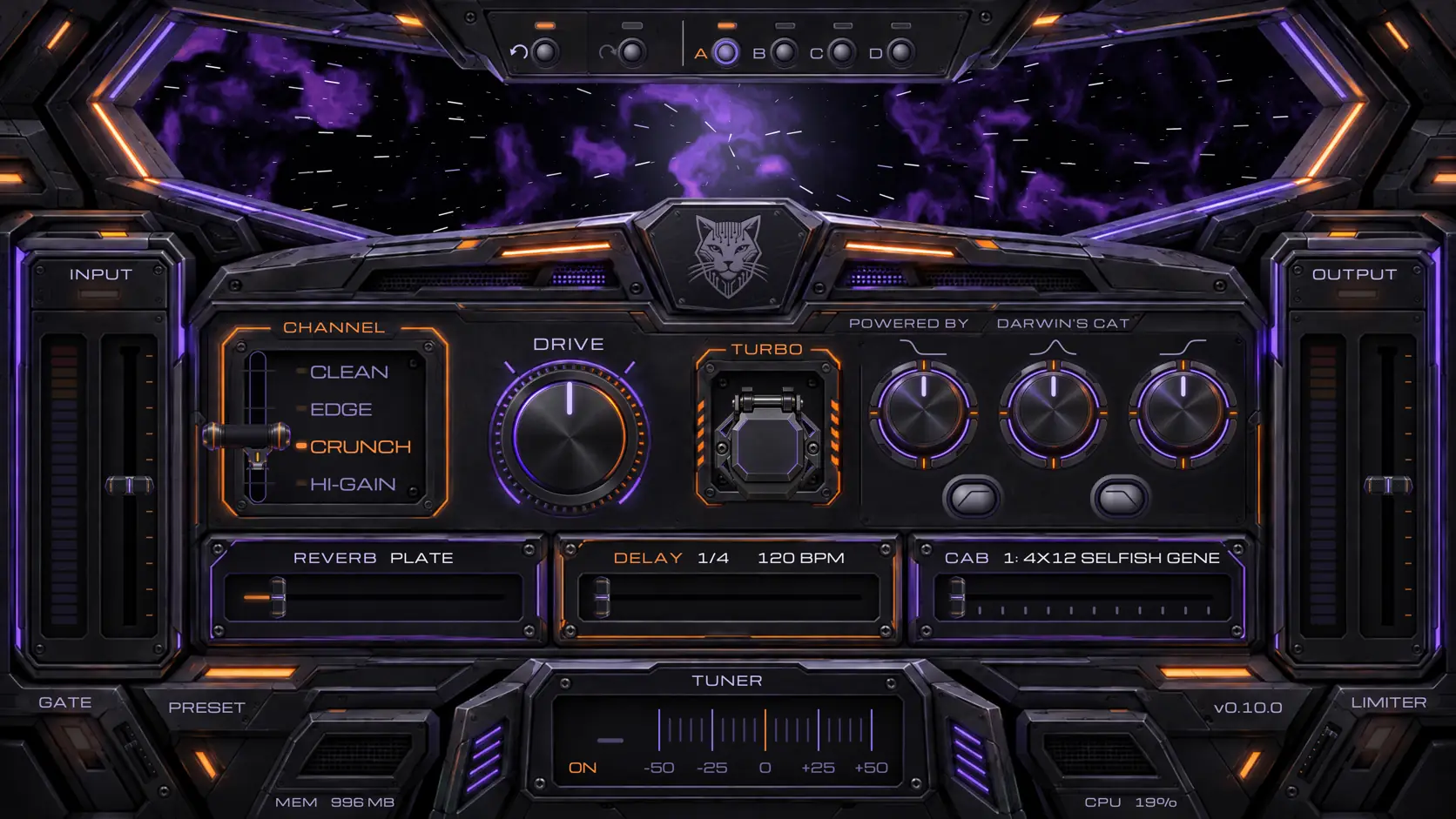
CatpitAmp: a free Soldano X88-IR amp sim
v0.10.1 what's new
CatpitAmp is a completely free and completely open-source guitar amp: a VST3, AU and CLAP plugin and a standalone app for Linux, Windows and macOS.
This is Darwin’s Cat’s favourite sound: the Soldano X88-IR, a sound rooted in the legendary SLO-100. We hid it in a plugin and an app, and we share it with you. Use it.
Four channels of the Soldano X88-IR on NAM A2

For the captures we used the most advanced neural network technology there is today: NAM A2.
The hardware Soldano has a Normal/Altered channel and a Crunch/Overdrive channel. CatpitAmp has all four sounds:
-
CLEAN: the Normal channel.
-
EDGE: the Altered channel.
-
CRUNCH: the Crunch channel.
-
HI-GAIN: the Overdrive channel.
DRIVE: nine captures per channel

Every channel is captured nine times, with the gain knob at 9, 10, 11 and 12 o’clock, then 1, 2, 3, 4 and 5 o’clock, and every neural network was trained for 1000 to 1200 epochs. At 7 and 8 o’clock the real hardware does not sound great, so we replaced them with the 9 o’clock capture at a lower gain. The DRIVE knob switches between the captures or blends neighbouring ones smoothly. In smooth mode, DRIVE blends the captures in phase.
A capture you like can be downloaded as a .nam file, for another NAM plugin or a NAM-compatible pedal. The FAQ at the bottom of the page explains how.
How we made the captures
All captures were made with professional gear. The signal goes from a Focusrite Clarett+ 4Pre through a Radial JCR Studio Reamper into the Soldano X88-IR and back into the Clarett+. The amp’s tone knobs stay in the middle the whole time.

The original’s tone stack

The tone stack, BASS, MIDDLE and TREBLE, is copied from the original device: we measured it.

What we added
All of this is our own; the Soldano X88-IR and the Soldano SLO-100 have none of it:
-
HPF and LPF: low cut and high cut for the cabinet.
-
TURBO: the X88-IR’s own boost. It is not a TS: the capture plays two notches above the DRIVE setting, and above the top capture it pushes another 3 dB per notch. The output gets louder too, so the solo stands out over the band: how much is set by right-clicking TURBO, from −3 to +9 dB.
-
Reverb: six characters. Ambience for metal, Room for garage rock, punk and blues, Plate for classic rock and solos, Spring for blues, surf and rockabilly, Hall for ballads and modern rock, Modulated for indie and all kinds of atmospheric music.
-
Delay with tap tempo (a click on the word DELAY) and sync to the DAW’s tempo.
-
Gate that learns by itself: Learn listens to three seconds of silence and sets the threshold. It mutes at the start of the chain or after the amp, before the delay, the reverb and the cabinet; the second is the default. It closes in one of two modes: Normal or Metal.
-
TP Limiter at the output: true-peak, with a ceiling from −0.1 to −3 dB.
-
Tuner: an accurate one. Concert A is set in hertz; while tuning, the tuner can mute the amp.
-
Undo, redo and four registers: A, B, C, D. Every register has its own separate history.
-
Presets: a sound of your own can be saved and recalled.
-
MIDI in the standalone app: the channels, TURBO, HPF, LPF, DRIVE and the tone stack, table below. In a DAW, automation switches the channel and moves the knobs.
-
STEREO SPACE in the standalone app: mono from the guitar in, wide stereo out.
-
ASIO in the standalone app on Windows.
-
Clip lights at INPUT and OUTPUT.
-
The cockpit window: the stars, which can be steered by dragging the glass with the mouse or with the arrow keys, or a picture of what the amp is doing: spectrum, wave, shape, envelope, transfer curve.


Signal chain
There is one gate, and it mutes in one of two places: at the start of the chain or after the amp. In STEREO SPACE mode the stereo starts at the delay.
Download CatpitAmp
MIDI
In the standalone app CatpitAmp listens to every enabled MIDI input on all sixteen channels.
Program Change 1, 2, 3, 4 |
CLEAN, EDGE, CRUNCH, HI-GAIN |
Control Change 20, 21, 22 |
TURBO, HPF, LPF: ≥ 64 ON, < 64 OFF |
Control Change 23, 24, 25, 26 |
DRIVE, BASS, MIDDLE, TREBLE: 0 = MIN, 64 = 12:00, 127 = MAX |
CC 24, 25 and 26 look for their knob by name: where there is no such knob, the command does nothing. A controller that counts programs from zero sends one less for each. In a DAW all of this is switched by automation.
Mike Soldano
Mike Soldano started out as a guitarist who did not like the sound of his amps. He learned to fix them, then to modify them, then to build his own. The SLO-100 came out in 1987, the X88R rack preamp around 1988, and the X88-IR descends from it. The story of how he got from a Bassman copy that kept breaking down to an amp for Clapton is in our article Mike Soldano. I Set Out to Build an Amp for Myself.
CatpitAmp is free and will stay free. If you like it: feed the Cat
Soldano and X88-IR are trademarks of their owner. We are not affiliated with them and name the device only to say what we captured.
Frequently Asked Questions
What is playing up there?
CatpitAmp itself is running in the header, right in the browser. The guitar is DI recordings of riffs from our songs: Eleven Light Years, Deep Space Is My Home, Cat's Hard Day, I Am Projection and Fifth Dimension. The channels, the knobs, delay, reverb and the cabinet switch on the fly.
Do you use it yourselves?
Yes. When we record, we use the hardware itself and pick the IR in the DAW. We don't use the plugin much, simply because we have the original. But we do use it, for example for solos, where the sound can change a lot in the mix. And yes, the sound is very, very close to the original Soldano SLO-100. Though the cabinet we use is a little softer than Soldano's cabinets with V30 speakers.
How do I get a NAM capture out of CatpitAmp?
Right-click DRIVE → "Save the current sound as .nam…". If DRIVE moves in steps, you get the capture at the current knob position; if it moves smoothly, the nearer of the two. The result is a normal .nam file for another NAM plugin or a NAM-compatible pedal. The captures were made with the tone knobs in the middle.
What cabinets do the amps have?
TOP 12: twelve of the 52 Orbit Guitar Cab Builder factory presets, as impulse responses (IRs).
Why would I download the NAM captures and IRs?
If you have a NAM pedal and want this sound live, download them. Or if you like the sound but not the plugin, load the sound into another plugin.
Can I use your NAM captures and IRs in music, software and hardware?
Yes.
- Play, record, perform and sell music made with them: freely, no conditions.
- Share the files, including posting them on websites: with credit to Darwin's Cat.
- Build them into software or a device: if it is free itself, its source open under the GPL or AGPL, with credit to Darwin's Cat. Into a closed product only with our written permission.
Telling us where you used our NAM captures or IRs is optional, but we will be grateful for an email to band@darwinscat.com.
Which DAWs does CatpitAmp work in?
Any that opens VST3, CLAP or AU. Logic Pro and GarageBand use AU (macOS only); Ableton Live, Cubase, Reaper, Bitwig and Studio One use VST3; Reaper and Bitwig also CLAP. On Linux, VST3 and CLAP. Without a DAW, the standalone app works.
How is TURBO different from a TS?
A TS (Tube Screamer) colours the sound: it cuts the lows, lifts the mids and adds overdrive of its own. TURBO does not colour the sound: the X88-IR capture plays two notches above the DRIVE setting, so it is the device's own overdrive. And at the output the amp gets louder, so the solo stands out over the band: how much is set by right-clicking TURBO, from −3 to +9 dB.
Is CatpitAmp really free? What does AGPL mean?
Yes, completely free: no sign-up, no keys, no ads. The AGPL is a free license: the source code is open to everyone. Music recorded with CatpitAmp belongs to its author, commercial use included. Anyone who distributes a modified version of the program itself must open its code too.
Does CatpitAmp track me?
No. CatpitAmp goes online in two cases only. If you switch on the update check, it asks GitHub whether a new version is out: GitHub sees the IP address, the program's name and its version, nothing more. And if you click the cat on the panel, our website opens in your browser; it runs without cookies and without third-party trackers.
Why do you do this? Working for free is immoral by the logic of capitalism. Are you communists?
No, we are not communists. But we know that altruism is one of the most powerful weapons evolution ever invented. Not teeth, claws and poison spines, but altruism. We sing about it in our songs, for example in Eleven Light Years.
Is CatpitAmp connected to Soldano?
No. Soldano and X88-IR are trademarks of their owner. We captured the X88-IR and name it only to say what exactly we captured.
Why is it called CatpitAmp?
Catpit is a cockpit, only with a cat in it. We are Darwin's Cat, and everything we do is about cats. And space. And evolution. This is the Way.
What keys does CatpitAmp have?
1, 2, 3, 4 are the channels CLEAN, EDGE, CRUNCH, HI-GAIN. A, B, C, D are the registers. Cmd+Z is undo, Cmd+Shift+Z or Cmd+Y is redo (Ctrl on Windows and Linux). G switches the gate on and off. Full screen in the standalone app: Cmd+Ctrl+F on a Mac, F11 on Windows and Linux; Esc leaves it. The arrow keys steer the ship, the stars in the cockpit window. The keys also work with a Russian keyboard layout.
What about the logos?
In the download table, macOS has a pear scratched by a cat, and Windows has a window scratched by a cat, its tile falling off. We don't love Microsoft and Apple, if only because they make developers pay for the right to distribute their programs on their platforms, and on principle we don't use their logos. These logos are ours, and you can use them: the pear and the window as SVG.