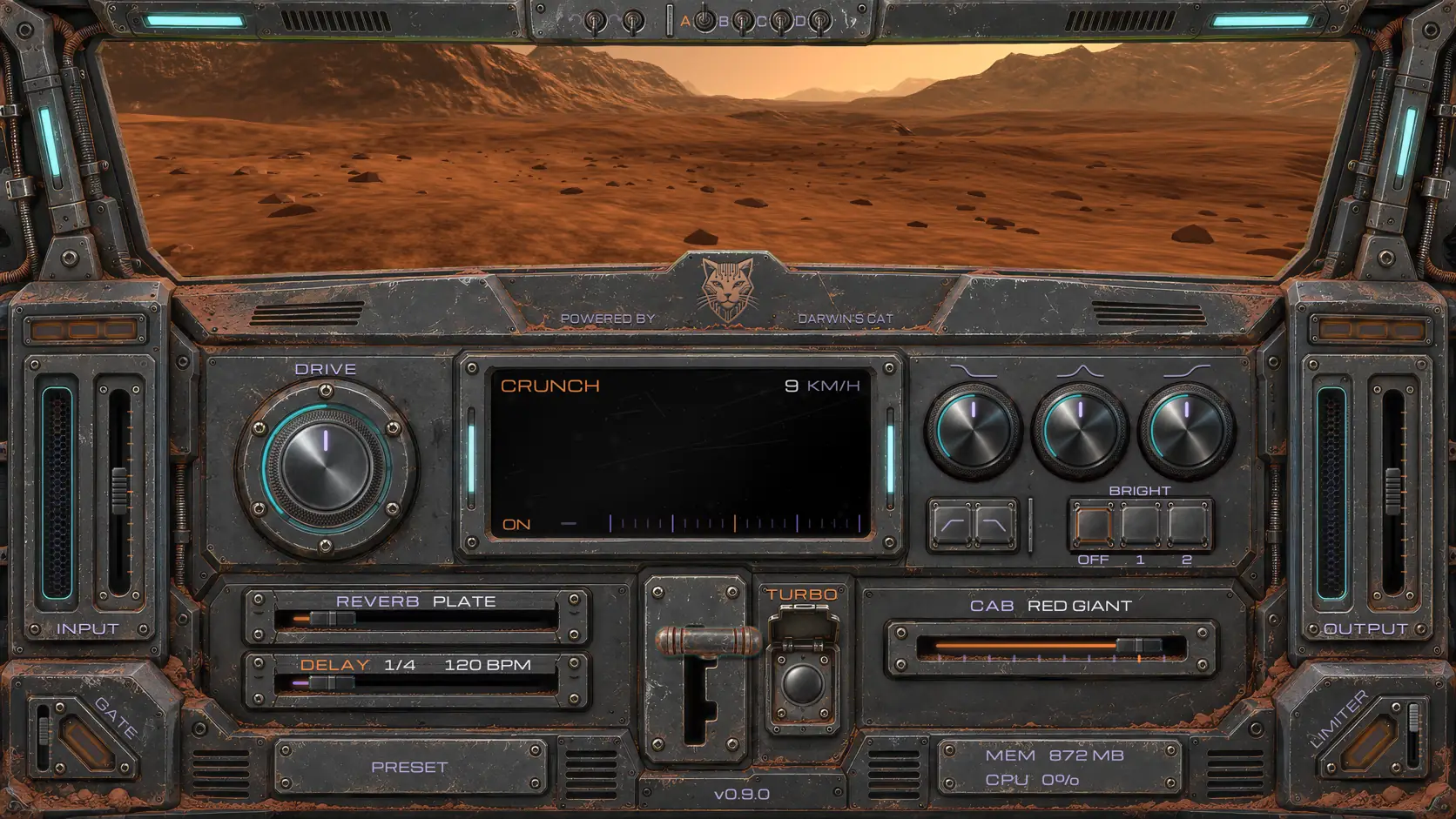
RedPawAmp: a free Friedman IR-X amp sim
v0.9.0 what's new
RedPawAmp is a completely free and open amp sim: a software guitar amp built on Neural Amp Modeler (NAM), based on our favourite sound, the Friedman BE-100 in its Friedman IR-X form.
RedPawAmp comes as a VST3, AU and CLAP plugin, and as a standalone app for Linux, Windows and macOS (all files).
The amp is completely free. No trials, no paid features, no subscriptions, no hidden ads and no sign-up. The source code is open on GitHub under the AGPL.
All 86 NAM models the plugin plays can also be downloaded on their own: one for the knob settings you need, or the whole set as one archive. Download the Friedman IR-X NAM models (NAM A2 full, 1000 epochs).
- Our favourite sound, and nothing extra
- What Friedman is
- Friedman IR-X: a tube BE-100 in pedal format
- Two channels and Turbo
- How we captured it
- Tools for playing and recording
- Reverb
- Delay
- Settings, comparison and control
- A guitar amp in a Mars rover’s cockpit
- MIDI
- Download RedPawAmp
- Frequently Asked Questions
Our favourite sound, and nothing extra
We, Darwin’s Cat, are collecting our favourite guitar sounds. The boutique sound of Friedman is one of them. It is on many of our studio recordings. We very much hope it finds its place in yours too, and that you get to know and love the sound of the Friedman BE-100.
We gave RedPawAmp to one favourite amp on purpose. We don’t like it when dozens of models and endless options get in the way of playing. So we polished a sound we enjoy playing ourselves, and added reverb, delay and a cabinet simulator (IR), so you can use it without other plugins and fit it to your track. A favourite sound, and nothing extra.
What Friedman is
People often say Friedman is "Marshall on steroids", and we think that is exactly right.
Friedman is an American brand of guitar tube amps, founded by the designer Dave Friedman. For years he worked on the gear of Eddie Van Halen, Steve Stevens and Jerry Cantrell. Repairs, setup, mods built to order. Friedman put his huge experience with artists on real stages into his own line of amps.
Friedman took the Marshall circuit as a starting point and tuned it to his own taste. The amp sounds even more Marshall than the original Marshall, and responds to the knobs far more predictably. It gives more gain with less noise. It gives better note definition. In our humble opinion its sound sits in a mix more easily without further processing, and that is why we value this marvel of engineering and experience.
Friedman Amplification is a very small private company: Dave designs the amps himself, checks how each one sounds personally and signs the finished units. Boutique Amps Distribution builds them.
Friedman IR-X: a tube BE-100 in pedal format
Dave Friedman himself says the IR-X is a full tube preamp in pedal format. Inside are two 12AX7 tubes, running at full high voltage. In essence it is the physical circuit of the BE-100 preamp.

RedPawAmp is a free amp sim of exactly this device, captured in NAM. More about the IR-X itself in our Friedman IR-X review.
Two channels and Turbo
Channel 1: Clean / Crunch. A British sound in the spirit of the Marshall Plexi: from a clean, bright and transparent tone to a warm, rough crunch. Open, dynamic, sensitive to the pick attack. Good for blues, classic rock and light hard rock. This is the BE-100’s Plexi channel; with firmware 2.0 the IR-X got a separate Plexi mode in it, closer still to the original. The three-position Bright switch controls the brightness, and brings the guitar forward in a dense mix when needed.

Channel 2: Overdrive / High Gain. The overdrive of the Friedman BE, the famous Brown Eye: a dense, saturated, aggressive British sound with strong mids, good note definition and long sustain. From 80s hard rock to modern metal. The Tight position makes the low end tighter and punchier, which helps a lot when recording rhythm guitars, and Fat adds fullness, weight and that punch in the chest.
Turbo / Boost is an extra mode of each channel. Gain Boost adds drive, saturation and sustain, and Volume Boost gives a separate volume level, for example to lift a solo in the mix. On the second channel the IR-X’s boost gives the gain structure of the even heavier HBE mode, the Hairy Brown Eye. Two channels with Turbo on or off give four main sounds.

How we captured it

For the captures we used NAM A2, the latest generation of Neural Amp Modeler networks. We captured our own Friedman IR-X on professional gear: the signal leaves a Focusrite Clarett+ 4Pre audio interface, goes through a Radial JCR Studio Reamper into the IR-X’s input, and from its output back into the same Clarett+. Bass, Middle and Treble stay in the middle, at 12 o’clock, the whole time, and the IR-X’s built-in power amp emulation is on: hence PowerAmp in the pack’s name.
We captured the Gain knob at nine positions: 9, 10, 11, 12, 13, 14, 15, 16 and 17 o’clock. At 7 and 8 o’clock the 9 o’clock capture plays. The DRIVE knob switches between the captures or blends neighbouring ones smoothly.
We captured the Bright, Tight and Fat modes, each with and without Boost.
In total, 54 captures of the first channel and 32 of the second. Every network was trained for 1000 epochs. The ESR error is between 0.0008 and 0.006 on the first channel and between 0.003 and 0.012 on the second. The training curve of every capture is on the Friedman IR-X pack page.
Tools for playing and recording

Tuner: a built-in guitar tuner.
Noise Gate: a gate that learns, to silence the noise of your guitar rig.
Peak Limiter: a safety peak limiter that protects the output from sudden peaks.
EQ: the BASS, MIDDLE, TREBLE tone stack comes from the device itself: we measured its curves. The HPF and LPF filters are ours, to control the low and high ends of the spectrum.
Cabinet Simulator: a guitar cabinet simulator based on impulse responses (IR). It comes with our own impulses of our beloved Orange PPC212V.

Reverb
There are six reverb types. Each has its own character; the genres below are pointers, not limits.
Plate: a dense, smooth reverb in the spirit of classic studio units. For rock guitars and solos that need space and an expressive tail. This is our default reverb.
Ambience: a short, unobtrusive space. A good starting point for metal and tight rhythm guitars, when you want more space without long reverb tails.
Hall: a spacious concert-hall reverb with a long tail. For atmospheric clean sounds, ballads and long solos.
Spring: the typical spring reverb of old guitar amps. For vintage rock, blues, rockabilly and surf.
Plate, Ambience, Hall and Spring should be fully enough for guitar, but we added two more:
Room: the natural feel of a small room. A versatile choice for blues, rock and clean sounds that need a little air and a live space.
Modulated: a reverb with a modulated tail that makes a soft, shifting space. For ambient, psychedelic rock and atmospheric guitar parts.
Delay
Delay: an echo synced to the tempo. In the plugin it follows the host (DAW); in the standalone app you can tap the tempo with Tap Tempo.
Settings, comparison and control
Undo / Redo let you take changes back and bring them back again, so you can experiment with the sound without fear of losing a good setting.
The A/B/C/D system gives four independent settings to compare. Each has its own full change history with Undo / Redo. You can switch between them and go back steps in each one without touching the others.
The standalone version supports MIDI control, so you can run the amp from external controllers.
A guitar amp in a Mars rover’s cockpit
RedPawAmp is also a Mars rover. Instead of the usual amp panel you sit in the cockpit of a research rover driving across the surface of Mars. Outside the windscreen is a 3D world, rendered in real time with OpenGL. The rover’s speed depends on the channel and on Turbo: the more aggressive the sound, the faster the ride.

You can steer across Mars with the keyboard or the mouse. And with some luck you will meet the most famous Mars rovers on the way.
The screen of the onboard radio shows the sound in real time. There are five display modes: Spectrum, Wave, Shape, Envelope and Transfer, from the spectrum and the waveform to its envelope and transfer curve. Shape deserves a special mention: in real time you can see the sound before the amp and after it.

Mars outside the window
The rover drives across the surface of Mars near the equator, the warmest place on Mars. Warmest means this: even at the end of the local winter the air warms up to +6 °C in the day, the ground under the wheels to +20 at a summer noon, and at night it is −70 to −75 all year round. A sol is 39 minutes longer than an Earth day, a year is 687 Earth days. A dust storm drives the wind up to 100 km/h, but the air there is sixty times thinner than ours, and such a storm pushes no harder than a light breeze on Earth.
Old machines may turn up along the road.
| Name | Year | Mass | Lasted | km | Power |
|---|---|---|---|---|---|
Mars Pathfinder |
1997 |
~360 kg |
83 sols |
— |
sun |
Sojourner |
1997 |
11 kg |
83 sols |
0.1 |
sun |
Spirit |
2004 |
185 kg |
6 years |
7.7 |
sun |
Opportunity |
2004 |
185 kg |
14.5 years |
45.2 |
sun |
Curiosity |
2012 |
899 kg |
15th year, still going |
~35 |
plutonium |
Perseverance |
2021 |
1025 kg |
6th year, still going |
30+ |
plutonium |
Huge respect to the engineers: they built machines to last tens of days, and those machines worked for tens of years. Opportunity was designed for 90 sols and worked for 14.5 years.
Pathfinder and Sojourner worked as a pair: the rover never went more than 12 metres from the station, because its link to Earth ran only through it. The station was named the Carl Sagan Memorial Station. Spirit got stuck in sand and did not survive the winter, and Opportunity choked in the 2018 dust storm: solar panels need the sun. Curiosity and Perseverance run on a plutonium RTG, the box on their backs, and dust and winter don’t bother them at all.
These are the ones exploring Mars: hardware that outlives its plan many times over, and the people who drive it from Earth with a signal delay of up to twenty minutes. Not a blowhard named Elon Musk, who in 2017 promised cargo ships on Mars by 2022, and people, a base and a fuel plant by 2024. There is still not a single one of his ships on Mars.
MIDI
In the standalone app RedPawAmp listens to every enabled MIDI input on all sixteen channels.
| Message | What it does |
|---|---|
Program Change 1, 2, 3, 4 |
CRUNCH, CRUNCH with TURBO, HI-GAIN, HI-GAIN with TURBO |
Control Change 20, 21, 22 |
TURBO, HPF, LPF: 64 and up switches on, below 64 switches off |
Control Change 23, 24, 25, 26 |
DRIVE, BASS, MIDDLE, TREBLE: 0 to 127 is the knob’s whole travel; for the tone knobs 64 is the middle |
A controller that counts programs from zero sends 0, 1, 2 and 3 for them. In a DAW the gears, TURBO and the knobs are switched by automation.
RedPawAmp is free and will stay free. If you like it: feed the Cat
Friedman and IR-X are trademarks of their owner. We are not affiliated with them and name the device only to say what we captured.
Download RedPawAmp
| macOS | darwinscat-amps-0.9.0-macos.pkg | 87 MB |
| Windows | darwinscat-amps-0.9.0-windows-arm64.zip | 81 MB |
| darwinscat-amps-0.9.0-windows-x64-setup.exe | 55 MB | |
| darwinscat-amps-0.9.0-windows-x64.zip | 81 MB | |
| Linux | darwinscat-amps-0.9.0-linux-arm64.tar.xz | 60 MB |
| darwinscat-amps-0.9.0-linux-x86_64.tar.xz | 72 MB | |
| Checksums | SHA256SUMS | 633 B |
Frequently Asked Questions
How do I get a NAM capture out of RedPawAmp?
Right-click DRIVE → "Save the current sound as .nam…". If DRIVE moves in steps, you get the capture the knob stands on; if it moves smoothly, the nearer of the two. The result is a normal .nam file for another NAM plugin or a NAM-compatible pedal. All the captures at once are on the Friedman IR-X pack page.
How do I get the cabinet IR out, and load my own?
Right-click CAB to open the cabinet window. SAVE stores the one that is playing as a .wav file. ADD adds your own IRs, or simply drag a file onto the app window. BYPASS takes the cabinet out of the sound completely.
Why would I download the NAM captures and IRs?
If you have a NAM pedal and want this sound live, download them. Or if you like the sound but not the plugin, load the sound into another plugin.
How is RedPawAmp different from other NAM captures of the IR-X?
It is complete. Most people capture the device at a few settings. We captured our IR-X in full: both channels, the Gain knob at nine positions from 9 to 17 o'clock, every Bright, Tight and Fat position, with and without boost. 86 captures in total, 1000 training epochs each; the ESR and training curve of every one are open on the Friedman IR-X pack page. The DRIVE knob switches between the captures or blends neighbouring ones smoothly, like Gain on the device itself.
Can I use your NAM captures and IRs in music, software and hardware?
Yes.
- Play, record, perform and sell music made with them: freely, no conditions.
- Share the files, including posting them on websites: with credit to Darwin's Cat.
- Build them into software or a device: if it is free itself, its source open under the GPL or AGPL, with credit to Darwin's Cat. Into a closed product only with our written permission.
Which DAWs does RedPawAmp work in?
Any that opens VST3, CLAP or AU. Logic Pro and GarageBand use AU (macOS only); Ableton Live, Cubase, Reaper, Bitwig and Studio One use VST3; Reaper and Bitwig also CLAP. On Linux, VST3 and CLAP. Without a DAW, the standalone app works.
What does TURBO do?
It switches on the Friedman IR-X's own Boost. We captured that too: every Gain position on both channels with Boost and without. And on TURBO the rover drives faster.
Is RedPawAmp really free? What does AGPL mean?
Yes, completely free: no sign-up, no keys, no ads. The AGPL is a free license: the source code is open to everyone. Music recorded with RedPawAmp belongs to its author, commercial use included. Anyone who distributes a modified version of the program itself must open its code too.
Does RedPawAmp track me?
No. RedPawAmp goes online in two cases only. If you switch on the update check, it asks GitHub whether a new version is out: GitHub sees the IP address, the program's name and its version, nothing more. And if you click the cat on the panel, our website opens in your browser; it runs without cookies and without third-party trackers.
Why do you do this? Working for free is immoral by the logic of capitalism. Are you communists?
No, we are not communists. But we know that altruism is one of the most powerful weapons evolution ever invented. Not teeth, claws and poison spines, but altruism. We sing about it in our songs, for example in Eleven Light Years.
Is RedPawAmp connected to Friedman?
No. Friedman and IR-X are trademarks of their owner. We captured our own IR-X and name it only to say what exactly we captured.
What keys does RedPawAmp have?
1 and 2 are the CRUNCH and HI-GAIN gears, T is TURBO. A, B, C, D are the registers. Cmd+Z is undo, Cmd+Shift+Z or Cmd+Y is redo (Ctrl on Windows and Linux). G switches the gate on and off. Full screen in the standalone app: Cmd+Ctrl+F on a Mac, F11 on Windows and Linux; Esc leaves it. The ← and → arrows steer the rover, or drag the windscreen with the mouse. The keys also work with a Russian keyboard layout.
What about the logos?
In the download table, macOS has a pear scratched by a cat, and Windows has a window scratched by a cat, its tile falling off. We don't love Microsoft and Apple, if only because they make developers pay for the right to distribute their programs on their platforms, and on principle we don't use their logos. These logos are ours, and you can use them: the pear and the window as SVG.