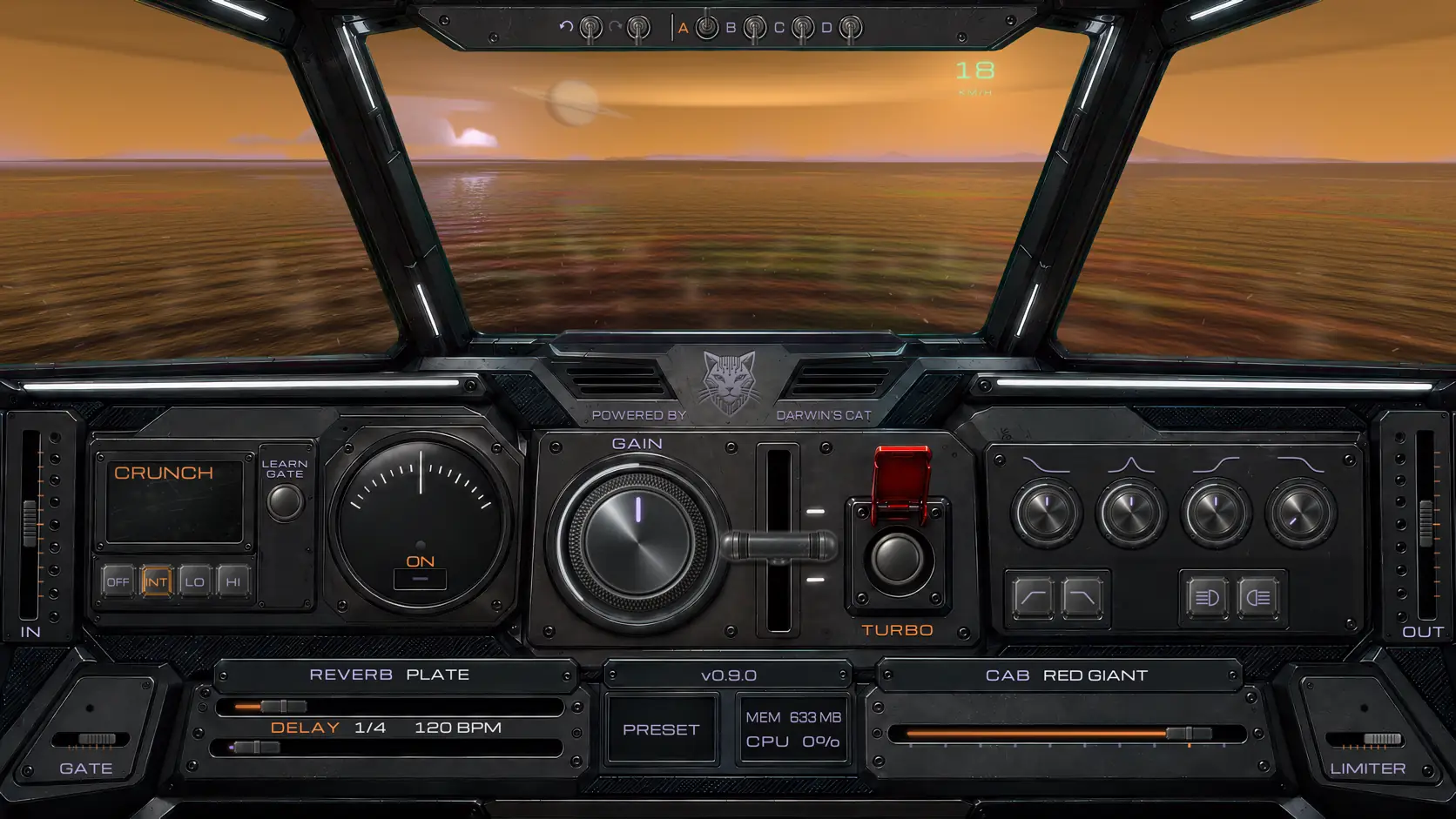
AmberPawAmp: a free Victory V4 amp sim
AmberPawAmp is a completely free and open amp sim: a software guitar amp built on Neural Amp Modeler (NAM). Inside are three Victory V4 tube preamp pedals, The Copper, The Sheriff and The Kraken, one for each gear.
AmberPawAmp comes as a VST3, AU and CLAP plugin, and as a standalone app for Linux, Windows and macOS (all files).
The amp is completely free. No trials, no paid features, no subscriptions, no hidden ads and no sign-up. The source code is open on GitHub under the AGPL.
All 54 NAM captures the plugin plays can also be downloaded on their own: each capture as its own file, or a pedal’s whole pack as one archive. Download the NAM captures of the V4 The Copper, V4 The Sheriff and V4 The Kraken (NAM A2, 800 epochs).
One line, and nothing extra
AmberPawAmp is dedicated to one line of pedals, the Victory V4: The Copper, The Sheriff and The Kraken, one per gear. We don’t like it when dozens of models and endless options get in the way of playing. So there are only three pedals here, with reverb, delay and a cabinet simulator (IR), so you can play without other plugins and fit the sound to your own track.
What Victory is
Victory Amplification is a British brand of tube guitar amps. It came to market on 2 October 2013 with three hand-built amps: the V10 The Baron, the V50 The Earl and the V100 The Duke. Victory’s designer is Martin Kidd, a guitarist and self-taught amp designer: he never formally studied electronics, and before Victory he drew circuits for Cornford amps. Victory amps are still designed and built in England.
The V4 pedals house the preamps of Victory amps in steel enclosures that sit on the floor. The Countess, The Sheriff and The Kraken were shown at NAMM in the summer of 2018, and The Copper came out in November 2020. Each has four tubes and an all-tube signal path, and it goes not in front of an amp’s preamp but in place of it. The most surprising thing about them is the tubes. The CV4014 pentodes in the V4 pedals were made in 1981 at the Mullard factory in Mitcham for the British Ministry of Defence and spent four decades in a Royal Navy store at Spring Quarry, deep underground, in a Cold War bunker that, luckily, was never needed.
The story of Martin Kidd and Victory, from a Marshall that cost eighty pounds to tubes from a bunker, is in our article Martin Kidd and Victory. Valve overdrive from valves.
Three pedals, three gears and TURBO
AmberPawAmp’s lever has three gears, and each gear is its own Victory V4 pedal. TURBO switches the pedal to its second sound. Three pedals with and without TURBO give six sounds, and each gear has its own tone knobs, like its pedal.
CLEAN: The Copper. Victory calls it its British tube preamp with "chime"; it is based on the VC35 The Copper amp. Without TURBO the sound goes from clean to slightly warmed up. TURBO switches on its Treble Boost: the booster pushes the tube preamp further, into a creamy overdrive with sustain. Hence the letters TB in the file names of its captures. It has five tone knobs. TONE tilts the whole sound: to the left darker, to the right brighter. TREBLE, MIDDLE and BASS as usual. BASS CUT has two positions, Off and On, and at On it cuts the deepest lows.
CRUNCH: The Sheriff. Victory calls it its pedal preamp for classic rock. Victory describes the first channel as going from the very edge of breakup to thick classic rock. TURBO switches on the second channel (in the packs it is called Boost): a modified Plexi at full gain, with more aggressive mids. Tone knobs: BASS, MIDDLE, TREBLE and BRIGHT.
HI-GAIN: The Kraken. Victory calls it its most extreme pedal preamp. The first channel is looser, a British overdrive closer to vintage. The second, on TURBO, is tighter in the bass, with cutting mids and, of course, a lot more gain. The same tone knobs: BASS, MIDDLE, TREBLE and BRIGHT.
BRIGHT on The Sheriff and The Kraken sits at one of three positions: norm, −1 or −2. At −1 there is less top, at −2 less still. Every gear opens on norm, and The Copper’s BASS CUT on Off.
The tone knobs are based on the pedal’s own tone stack. When the gear changes, the row of knobs rearranges itself: CLEAN has five, CRUNCH and HI-GAIN four each.
How we captured it
For the captures we used NAM A2, the latest generation of Neural Amp Modeler networks. We captured the pedals: a 2025 The Copper, a 2026 The Sheriff and a 2018 The Kraken. The pedals' tone knobs were set to 12 o’clock.
We captured each pedal’s Gain knob at nine positions: 9, 10, 11, 12, 13, 14, 15, 16 and 17 o’clock, and each position with TURBO and without. At 7 and 8 o’clock the 9 o’clock capture plays, only with a lower input level. The big GAIN knob switches between the captures or blends neighbouring ones smoothly.
That is 18 captures per pedal and 54 for the whole AmberPawAmp. Every network was trained for 800 epochs. The ESR error:
| Pedal | Without TURBO | With TURBO |
|---|---|---|
The Copper |
0.0024 to 0.0093 |
0.0053 to 0.0236 |
The Sheriff |
0.0029 to 0.0056 |
0.0049 to 0.0076 |
The Kraken |
0.0078 to 0.0108 |
0.0085 to 0.0283 |
The training curve of every capture is on the V4 The Copper, V4 The Sheriff and V4 The Kraken pack pages.
Tools for playing and recording
Tuner: a built-in tuner, the needle on the round gauge left of the panel’s centre. The reference pitch for A is set in hertz, and while you tune, the tuner can mute the amp.
Noise Gate: a gate that learns. LEARN listens to three seconds of silence and sets the threshold itself; its key is by the radio screen. The gate closes in one of two modes, Normal or Metal, and mutes at the start of the chain or after the amp, before delay, reverb and the cabinet; the second is the default. The threshold is on the small fader in the bottom left corner of the panel.
Limiter: a safety true-peak limiter at the output. The ceiling goes from −3 to −0.1 dB, on the fader in the bottom right corner.
EQ: each gear has its own tone knobs, based on its pedal’s tone stack. The HPF and LPF filters are ours: they cut the low and high ends of the cabinet.
TURBO OUTPUT: with TURBO the amp also sounds louder, so the solo stands out over the band. By 3 dB by default, and a right-click on TURBO picks −3, 0, +3, +6 or +9 dB. The boost comes at the very end, after the cabinet, reverb and delay, before OUTPUT and the limiter.
Cabinet Simulator: a guitar cabinet simulator based on impulse responses (IR). It comes with ten of our own IRs of the Orange PPC212V cabinet, and every gear opens on RED GIANT. A right-click on CAB opens the cabinet window: there you can save the IR that is playing or add your own.
Reverb
There are six reverb types. Each has its own character; the genres below are pointers, not limits.
Plate: a dense, smooth reverb in the spirit of classic studio units. For rock guitars and solos that need space and an expressive tail. This is our default reverb.
Ambience: a short, unobtrusive space. A good starting point for metal and tight rhythm guitars, when you want more space without long reverb tails.
Hall: a spacious concert-hall reverb with a long tail. For atmospheric clean sounds, ballads and long solos.
Spring: the typical spring reverb of old guitar amps. For vintage rock, blues, rockabilly and surf.
Plate, Ambience, Hall and Spring should be fully enough for guitar, but we added two more:
Room: the natural feel of a small room. A versatile choice for blues, rock and clean sounds that need a little air and a live space.
Modulated: a reverb with a modulated tail that makes a soft, shifting space. For ambient, psychedelic rock and atmospheric guitar parts.
Every gear opens on Plate, and the cleaner the sound, the more room it gets: CLEAN 20%, CRUNCH 15%, HI-GAIN 10%, with TURBO 30%. Each gear remembers the room you chose and its amount by itself.
Delay
Delay: an echo synced to the tempo. In the plugin it follows the host (DAW); in the standalone app you can tap the tempo with Tap Tempo.
CLEAN opens with 15% delay, CRUNCH with 8%, HI-GAIN with none; with TURBO, CLEAN and CRUNCH get 30% each, and HI-GAIN stays dry even with TURBO.
Settings, comparison and control
Undo / Redo let you take changes back and bring them back again, so you can experiment with the sound without fear of losing a good setting.
The A/B/C/D system gives four independent settings to compare. Each has its own full change history with Undo / Redo. You can switch between them and go back steps in each one without touching the others.
The standalone version supports MIDI control, so you can run the amp from external controllers.
The Undo / Redo and A/B/C/D keys are in the cockpit’s top panel, above the middle pane. You can save your sound as a preset and come back to it later. An external MIDI controller switches the gears, TURBO, the filters, GAIN and the first three tone knobs (table below).
A guitar amp in a helicopter’s cockpit
AmberPawAmp is also a helicopter. Instead of the usual amp panel you sit in a cockpit under a canopy of three panes, and behind them is a 3D Titan, rendered in real time with OpenGL. The helicopter flies low over a methane sea: the pilot’s eyes are only 2.6 metres above the liquid. The speed depends on the gear: about 9 km/h on CLEAN, 18 on CRUNCH, 31 on HI-GAIN. TURBO is a dash at double speed, with the nose lower. In turns the helicopter banks, at speed it dips its nose, and it sways a little all the time. You can steer with the ← and → arrows or by dragging the cockpit glass with the mouse.
Besides the live Titan, the LANDSCAPE menu has a simplified "1993" landscape drawn by the processor, in Titan’s colours, and a still picture.
Outside the glass are a far shore with dunes, ripples, smooth patches and mist over the liquid. You come across fields of nitrogen foam, where the sea fizzes like champagne, and now and then a "magic island": a pale, rough patch that shows on the liquid and fades again. Buoys stand in pairs like gates, red and green, or alone, amber, and blink. On the horizon, sixteen kilometres away, a cryovolcano erupts from time to time, far over the sea a storm flashes with lightning, and a drizzle falls from above. The rotor’s shadow sometimes runs across the glass, and the downwash tears the liquid under the helicopter into spray, most of all in a hover. And above it all Saturn hangs in the haze.
Drops of methane settle on the canopy: from the drizzle, from the spray under the rotor and from the foam, if you fly through a nitrogen field. The oncoming air drives them up the glass; they merge, leave trails and dry up. Each of the three panes has its own wiper, and four keys under the radio screen set their pace: OFF (they stop; a sweep already started finishes), INT (a sweep once a minute, the default), LO (non-stop, with a pause between sweeps) and HI (non-stop and faster). Two keys to the right of the filters, under TREBLE, switch on the searchlights under the nose, left and right: they shine down on the sea ahead, and their beams show in the haze.
The screen of the onboard radio shows the gear and the speed on its top line and the sound in real time below. There are five display modes: Spectrum, Wave, Shape, Envelope and Transfer, from the spectrum and the waveform to the envelope and the transfer curve. It starts on Shape: it shows the sound before the amp and after it. A right-click on the screen picks the picture. And the speed also glows as a hologram in the top right corner of the middle pane.
Titan outside the glass
Titan is Saturn’s largest moon, bigger than the planet Mercury. It orbits 1.2 million kilometres from Saturn. At the surface it is −179 °C: in such cold, water ice plays the part of rock. The atmosphere is about 95% nitrogen and 5% methane, and the pressure at the surface is 60% higher than on Earth. Apart from Earth, Titan is the only known place with liquid on its surface. It has clouds, rain, rivers, lakes and seas of methane and ethane, and methane storms flood the surface from time to time.
Titan’s largest sea, Kraken Mare, holds about 80% of all the liquid on its surface. It is almost the size of all five Great Lakes together, and in the middle it is at least 300 metres deep. It is named after the Kraken, the legendary monster of the Norwegian seas. The pedal on HI-GAIN, in case anyone forgot, is The Kraken too.
The nitrogen foam on the sea is not quite made up either. In 2017 JPL showed that a lot of nitrogen dissolves in cold liquid methane, and at the slightest change in temperature, pressure or composition it quickly comes out of the solution. Titan’s lakes seem to breathe nitrogen: they breathe in as they cool and breathe out as they warm. Bubbles are also one possible explanation of the "magic islands". Over several flybys Cassini’s radar saw small patches on the seas that appeared and vanished, and one of them later appeared again.
Saturn in the haze is drawn at its true size. A ball 120,500 km wide at the equator, seen from 1.2 million kilometres, spans almost six degrees, eleven Moons in a row. The liberty is elsewhere: through Titan’s real orange haze you can’t make out Saturn with the eye. From the surface you could see it only in near-infrared light, and only if the weather allows.
Two more liberties. No lightning has been found on Titan yet: in 126 close flybys Cassini did not catch a single radio signal from it, so lightning there is either very weak, or very rare, or not there at all. And the cryovolcano on the horizon is speculative too. Ice volcanoes have long been looked for on Titan, the best candidates being Hotei Regio and Sotra Patera with Doom Mons, but whether there is any cryovolcanism there at all is still an open question. And nobody has set out buoys on Titan, of course.
So far a helicopter flies over Titan only here. Here is who has really been to Titan and who is going there.
| Spacecraft | At Titan | What it did |
|---|---|---|
Pioneer 11 |
1979 |
the first to study Titan, flying through the Saturn system |
Cassini |
2004 to 2017 |
the first to orbit Saturn, flew close past Titan 126 times, and at the end was sent into Saturn on purpose |
Huygens |
14 January 2005 |
descended on parachutes for 2 hours 28 minutes and landed: the first landing in the outer Solar System |
Dragonfly |
late 2034 |
NASA’s rotorcraft, launching no earlier than July 2028 |
Huygens, an ESA probe, sent data from the surface at least for as long as Cassini stood above Titan’s horizon, and radio telescopes on Earth kept catching its signal long after calculations suggested the probe should have gone silent.
Dragonfly measures 3.85 by 3.85 metres and has eight pairs of coaxial rotors with blades 1.35 metres long. The dense, calm atmosphere and the low gravity make flying the best way to get around Titan. It will land in the dunes, and over 3.3 years of work it will fly as far as Selk crater. Its power comes from the same kind of source as Curiosity’s and Perseverance’s on Mars; RedPawAmp tells their story.
MIDI
In the standalone app AmberPawAmp listens to every enabled MIDI input on all sixteen channels.
Program Change 1, 2, 3, 4, 5, 6 |
CLEAN, CLEAN + TURBO, CRUNCH, CRUNCH + TURBO, HI-GAIN, HI-GAIN + TURBO |
Control Change 20, 21, 22 |
TURBO, HPF, LPF: ≥ 64 ON, < 64 OFF |
Control Change 23, 24, 25, 26 |
GAIN, BASS, MIDDLE, TREBLE: 0 = MIN, 64 = 12:00, 127 = MAX |
In the MIDI window the GAIN knob is still called DRIVE, as on the Mars rover. The Copper’s TONE and BASS CUT and the BRIGHT of The Sheriff and The Kraken can’t be switched over MIDI.
CC 24, 25 and 26 look for their knob by name: where there is no such knob, the command does nothing. A controller that counts programs from zero sends one less for each. In a DAW all of this is switched by automation.
AmberPawAmp is free and will stay free. If you like it: feed the Cat
Victory and the V4 pedal names (The Copper, The Sheriff, The Kraken) are trademarks of their owner. We are not affiliated with them and name the pedals only to say what we captured.
Download AmberPawAmp
| macOS | darwinscat-amps-0.9.1-macos.pkg | 87 MB |
|---|---|---|
| Windows | darwinscat-amps-0.9.1-windows-arm64.zip | 81 MB |
| darwinscat-amps-0.9.1-windows-x64-setup.exe | 55 MB | |
| darwinscat-amps-0.9.1-windows-x64.zip | 81 MB | |
| Linux | darwinscat-amps-0.9.1-linux-arm64.tar.xz | 61 MB |
| darwinscat-amps-0.9.1-linux-x86_64.tar.xz | 76 MB | |
| Checksums | SHA256SUMS | 633 B |
Frequently Asked Questions
What is playing up there?
AmberPawAmp itself is running in the header, right in the browser. The guitar is DI recordings of riffs from our songs: Eleven Light Years, Deep Space Is My Home, Cat's Hard Day, I Am Projection and Fifth Dimension. The channels, the knobs, delay, reverb and the cabinet switch on the fly.
How do I get a NAM capture out of AmberPawAmp?
Right-click GAIN to open its menu. If GAIN moves in steps (DRIVE TURNS: In steps), the menu has "Save the current sound as .nam…", and you get the capture the knob stands on. If it moves smoothly (Smoothly), it has "Save the nearest capture as .nam…", and you get the nearer of the two. The result is a normal .nam file for another NAM plugin or a NAM-compatible pedal. All the captures at once are on the V4 The Copper, V4 The Sheriff and V4 The Kraken pack pages.
How do I get the cabinet IR out, and load my own?
Right-click CAB to open the cabinet window. SAVE stores the one that is playing as a .wav file. ADD adds your own IRs, or simply drag a file onto the app window. BYPASS takes the cabinet out of the sound completely.
Why would I download the NAM captures and IRs?
If you have a NAM pedal and want this sound live, download them. Or if you like the sound but not the plugin, load the sound into another plugin.
How is AmberPawAmp different from separate NAM captures of the V4?
Every pedal is captured over the whole travel of its Gain knob: at nine positions, from 9 to 17 o'clock, and each position with TURBO and without. That is 18 captures per pedal and 54 for the whole AmberPawAmp, 800 training epochs each. The ESR and training curve of every one are open on the V4 The Copper, V4 The Sheriff and V4 The Kraken pack pages. The GAIN knob switches between the captures or blends neighbouring ones smoothly.
Can I use your NAM captures and IRs in music, software and hardware?
Yes.
- Play, record, perform and sell music made with them: freely, no conditions.
- Share the files, including posting them on websites: with credit to Darwin's Cat.
- Build them into software or a device: if it is free itself, its source open under the GPL or AGPL, with credit to Darwin's Cat. Into a closed product only with our written permission.
Which DAWs does AmberPawAmp work in?
Any that opens VST3, CLAP or AU. Logic Pro and GarageBand use AU (macOS only); Ableton Live, Cubase, Reaper, Bitwig and Studio One use VST3; Reaper and Bitwig also CLAP. On Linux, VST3 and CLAP. Without a DAW, the standalone app works.
What does TURBO do?
It switches the gear's pedal to its second sound. On CLEAN that is The Copper's Treble Boost, on CRUNCH and HI-GAIN the second channel of The Sheriff and The Kraken (in the packs it is called Boost). Every Gain position of every pedal is captured both with TURBO and without. The amp also sounds louder, so the solo stands out over the band: by 3 dB by default, and a right-click on TURBO picks from −3 to +9 dB. And on TURBO the helicopter dashes at double speed.
Why is the big knob called GAIN and not DRIVE?
It is the same knob as DRIVE on the RedPawAmp Mars rover: it switches between the pedal's captures or blends neighbouring ones smoothly. In the helicopter's cockpit it is labelled GAIN. That is its name in the V4 packs too, and on The Copper and The Kraken themselves the drive knob is also Gain. The old name DRIVE stayed in the MIDI window and in the right-click menu (DRIVE TURNS).
Why does CLEAN have five tone knobs, and CRUNCH and HI-GAIN four?
Because the pedals are different, and each gear has its pedal's knobs. The Copper has TONE, TREBLE, MIDDLE, BASS and BASS CUT; The Sheriff and The Kraken have BASS, MIDDLE, TREBLE and BRIGHT. When the gear changes, the row of knobs rearranges itself. TONE tilts the whole sound, darker to the left, brighter to the right; BASS CUT at On cuts the deepest lows; BRIGHT at −1 and −2 reduces the highs, more at −2.
What do the wipers and the searchlights do?
They are for the flight; they don't affect the sound. Drops of methane from the drizzle and the spray settle on the canopy, and each of the three panes has its own wiper. Four keys under the radio screen set their pace: OFF (they stop), INT (a sweep once a minute, the default), LO (non-stop, with a pause between sweeps) and HI (non-stop and faster). Two keys to the right of the filters, under TREBLE, switch on the searchlights under the nose, left and right: the light falls on the sea ahead, and the beam shows in the haze. AmberPawAmp remembers what you chose.
Why Titan?
In recent years humanity has learned far more about Titan: Cassini flew close past it 126 times, Huygens landed on its surface, and in 2028 the Dragonfly rotorcraft launches towards it. We want to draw attention to this amazing world.
Is AmberPawAmp really free? What does AGPL mean?
Yes, completely free: no sign-up, no keys, no ads. The AGPL is a free license: the source code is open to everyone. Music recorded with AmberPawAmp belongs to its author, commercial use included. Anyone who distributes a modified version of the program itself must open its code too.
Does AmberPawAmp track me?
No. AmberPawAmp goes online in two cases only. If you switch on the update check, it asks GitHub whether a new version is out: GitHub sees the IP address, the program's name and its version, nothing more. And if you click the cat on the panel, our website opens in your browser; it runs without cookies and without third-party trackers.
Why do you do this? Working for free is immoral by the logic of capitalism. Are you communists?
No, we are not communists. But we know that altruism is one of the most powerful weapons evolution ever invented. Not teeth, claws and poison spines, but altruism. We sing about it in our songs, for example in Eleven Light Years.
Is AmberPawAmp connected to Victory?
No. Victory and the V4 pedal names are trademarks of their owner. We captured The Copper, The Sheriff and The Kraken and name them only to say what exactly we captured.
What keys does AmberPawAmp have?
1, 2 and 3: the CLEAN, CRUNCH and HI-GAIN gears; T: TURBO. A, B, C, D: the registers. Cmd+Z: undo, Cmd+Shift+Z or Cmd+Y: redo (on Windows and Linux, Ctrl instead of Cmd). G switches the gate on and off. Full screen in the standalone app: Cmd+Ctrl+F on a Mac, F11 on Windows and Linux; Esc leaves it. The ← and → arrows steer the helicopter, or drag the cockpit glass with the mouse. The keys also work with a Russian keyboard layout. The wipers and the searchlights have no keys of their own on the keyboard: they are only on the panel.
What about the logos?
In the download table, macOS has a pear scratched by a cat, and Windows has a window scratched by a cat, its tile falling off. We don't love Microsoft and Apple, if only because they make developers pay for the right to distribute their programs on their platforms, and on principle we don't use their logos. These logos are ours, and you can use them: the pear and the window as SVG.